Setup
Installation of Apps
Installation of additional apps. This could be odoo apps and also third party apps.
Apps (= addons) are located in the path “…/odoo/odoo/addons”.
in the settings file “server.conf” a different path can be selected
- the developer modus is necessary for the activation:
Version 10.0+
go to Settings
click “Activate the developer mode”:
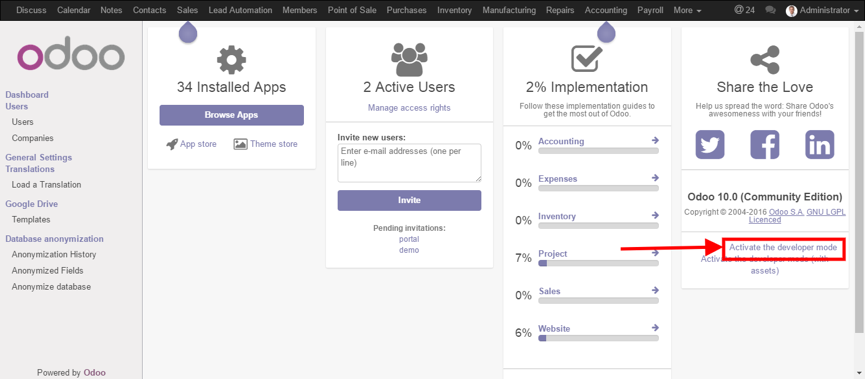
navigate to Apps menu
click Update Apps List
click Apps in left side bar
search and open a module you need
click “Install”
One Click Installation directly in odoo is at the moment (01.07.2017) due to malware problems deactivated (see https://www.odoo.com/de_DE/forum/hilfe-1/question/enable-the-one-click-installation-116008).
Therefore, download the to be installed apps and store them in the above mentioned path “…/odoo/odoo/addons”. Afterwards the app has to be activated as above is mentioned.
Installed Apps
The following apps are installed at the moment (April 2023):
Odoo 15 Accounting
Install the module Odoo 15 Accounting from Git to the subdirectory src/odoo/addons. This is realized via the temporary directory local/temp for the download of the Git repository and than move the files to src/odoo/addons.
mkdir local/temp
git clone -b 15.0 --single-branch --depth 1 https://github.com/odoomates/odooapps.git local/temp
mv local/temp/* src/odoo/addons
rm -rf local/temp
Activate additional apps in Odoo.
bin/odoo -c .logistics_test_cfg -i account,product,stock,purchase,hr,crm,project,mail,board,note --stop-after-init
bin/odoo -c .logistics_test_cfg -i om_account_accountant --stop-after-init
bin/odoo -c .logistics_test_cfg -i sale_management --stop-after-init
bin/odoo -c .logistics_test_cfg -i appointment --stop-after-init
bin/odoo -c .logistics_test_cfg -i l10n_ch --stop-after-init
bin/odoo -c .logistics_test_cfg -i sale --stop-after-init
bin/odoo -c .logistics_test_cfg -i om_hr_payroll_account --stop-after-init
Problem Management
Website always comes up at the start of odoo
Start the developer mode: http://localhost:8069/web#action=76
Another possibility: go to the folder “/Users/Friedrich/Library/Application Support/Odoo” (on macOS) and delete all objects in it (a little bit risky).